Active Directory & Domain Services for Dummies (AZ-140 Part 1)
 Hark SinghMarch 1, 2026
Welcome back to my AZ-140 (Azure Virtual Desktop Specialty) certification journey!
If you missed the kickoff, go check out Azure Networking Fundamentals for Dummies (AZ-140 Part 0). In that post, we built our new cloud "SSW office" using a simple analogy: VNets (The Building), Subnets (The Rooms), NSGs (The Security Guards), and FSLogix (The Magical Backpacks).
Today, we are tackling a topic that confuses almost everyone setting up Azure Virtual Desktop (AVD) for the first time: Active Directory Domain Services (AD DS).
Specifically, we'll answer why we still need it, why we can't just rely on Entra ID, and why we often have to build a whole Virtual Machine just for this one piece of software. Let's drop the tech jargon and jump back into our SSW office analogy.
1) What is AD DS? = The Old-School Building Manager
In our new cloud office (AVD), we already have Entra ID acting as our modern "Badge Office." But lurking in the background of almost every enterprise network is an older system.
What is it? Active Directory Domain Services (AD DS) is Microsoft's traditional, server-based identity and access management directory.
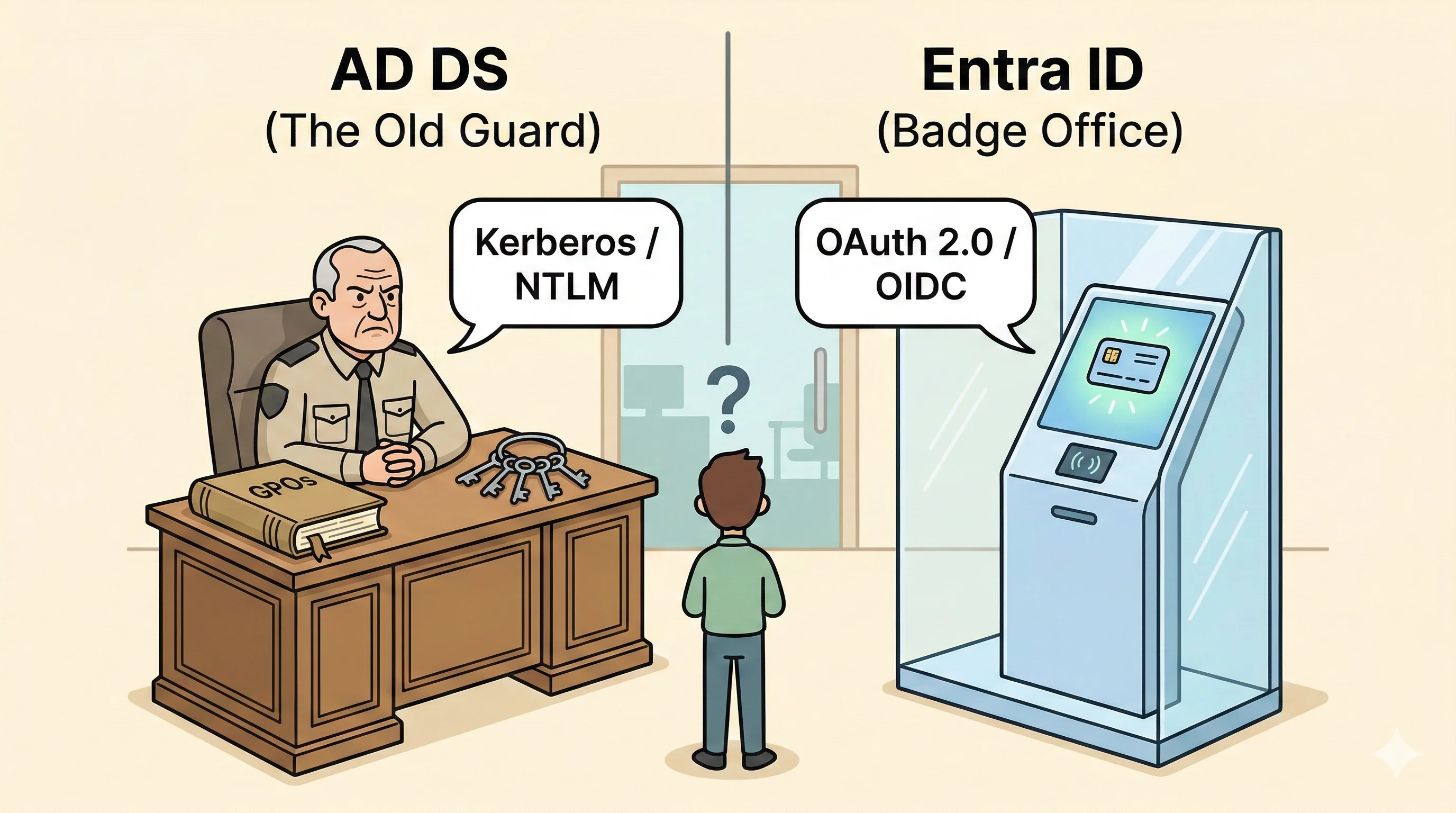
The Analogy: Think of AD DS as the Old-School Building Manager (The Old Guard). He sits at a heavy oak desk with a massive, physical rulebook and a giant ring of metal keys. He speaks an "old language" (traditional network protocols like Kerberos, with NTLM as a legacy fallback).
When an employee sits down at their virtual desk (Session Host), the desk needs to ask the Old Guard: "Who is this? And what strict rules apply to them today?"
Exam Tip: Every Session Host in AVD must be joined to a domain. That domain can be a traditional AD DS domain, a Microsoft Entra Domain Services managed domain, or Entra ID itself (for Entra-joined AVD). More on all three options below.
2) The Big Question: Why do we need it if we have Entra ID?
This is the biggest hurdle when studying for the AZ-140.
Entra ID is a modern, glowing Smart Keycard System (the "Badge Office & Security Clearance" from Part 0). You swipe your keycard to get into your email (Microsoft 365) or web apps. It knows who you are, but it speaks a "modern language" (cloud protocols like OAuth 2.0 and OpenID Connect).
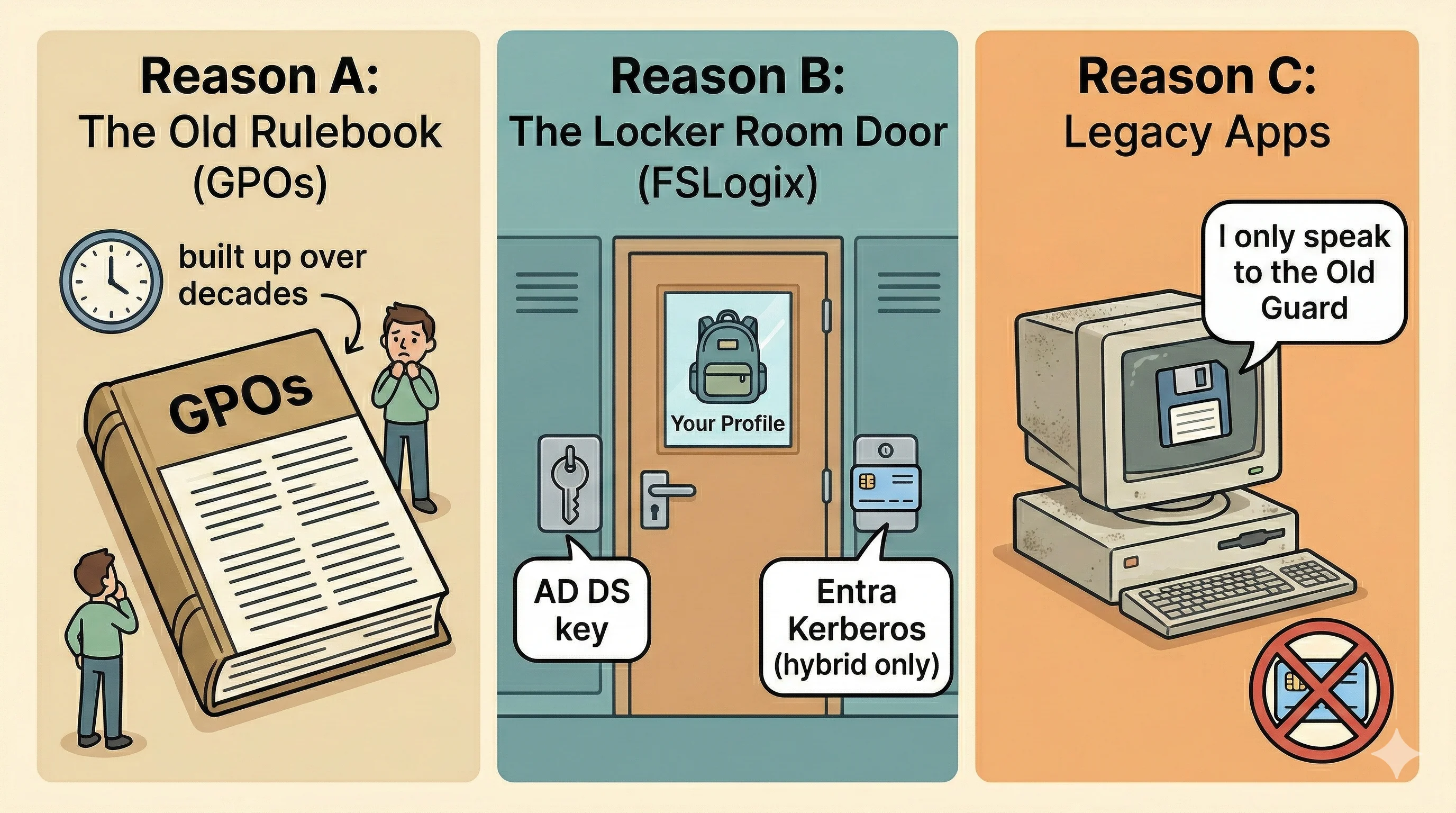
So why do we need the Old Guard (AD DS) if we have modern Smart Keycards? Because the actual Windows virtual machines (Session Hosts) in AVD are deeply traditional. They still rely on the Old Guard for three critical things:
Reason A: The Old Rulebook (Group Policy Objects)
The Old Guard has a giant binder of highly specific rules built up over decades, called Group Policy Objects (GPOs). They say things like, "When Hark logs in, automatically map the Z: drive to the marketing folder, set the desktop background to the company logo, and completely hide the control panel."
While Entra ID has modern ways to manage computers (like Intune), many companies have thousands of these old GPO rules. It is much easier to just keep the Old Guard around to enforce them than to rewrite the entire rulebook from scratch.
Reason B: The Locker Room Doors (FSLogix Profiles)
Remember FSLogix from Part 0? That is the "Magical Backpack" containing your user profile (C:\Users\Hark) that follows you to any hot-desk you sit at.
Those backpacks are stored in a highly secure, centralized "Locker Room" (like Azure Files). Traditionally, the doors to this Locker Room only accept the physical metal keys handed out by the Old Guard (traditional AD DS authentication).
The good news: Microsoft has modernised the lock. Azure Files now supports Entra ID Kerberos authentication, which means Entra-joined AVD hosts whose users are hybrid identities (synced from AD DS via Entra Connect) can open the Locker Room using a Smart Keycard. For purely cloud-only identities with no AD DS at all, this support is still in preview. Either way, the exam tests on both scenarios, so it is worth knowing the distinction.
Reason C: Legacy Applications
If your company relies on a piece of accounting software built 15 years ago, that software was specifically programmed to look for the Old Guard and ask, "Is this user allowed to open this ledger?" Without AD DS, that older software completely breaks because it doesn't understand the modern Smart Keycard system. There is no quick fix here; these apps need the Old Guard present on the network.
A note on Entra Connect: keeping both systems in sync
In most real-world AVD setups, you will have both Entra ID and AD DS running side by side. The obvious question is: does an employee need two separate accounts?
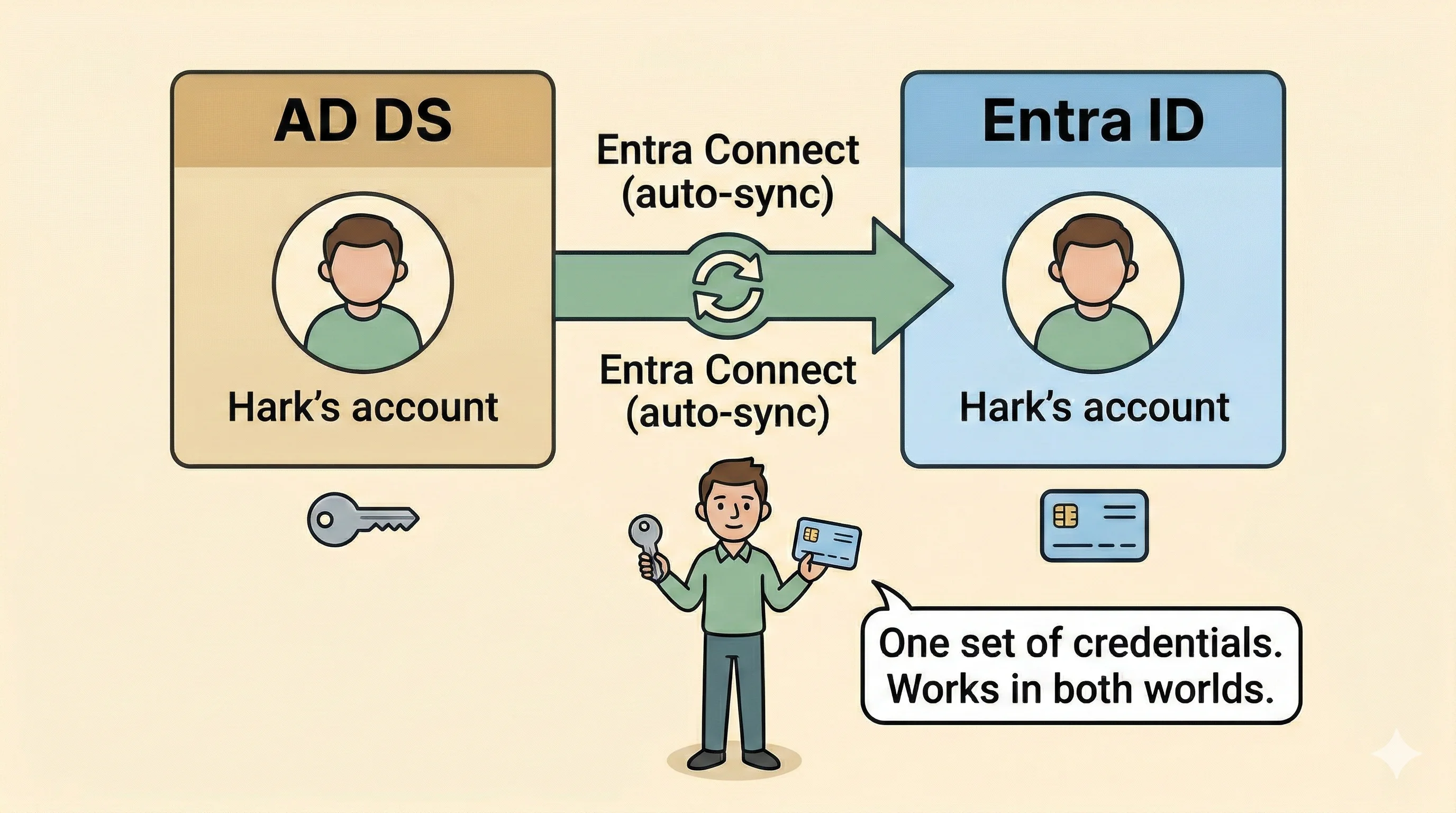
No. Microsoft Entra Connect (formerly Azure AD Connect) acts as an automatic sync bridge between the two systems. When an account is created or updated in AD DS, Entra Connect replicates it into Entra ID. The user has one set of credentials that works in both worlds. This sync relationship is a core concept in the AZ-140 exam.
3) The three identity options for AVD
The AZ-140 exam expects you to know that there are three ways to handle identity in an AVD environment, not just two.
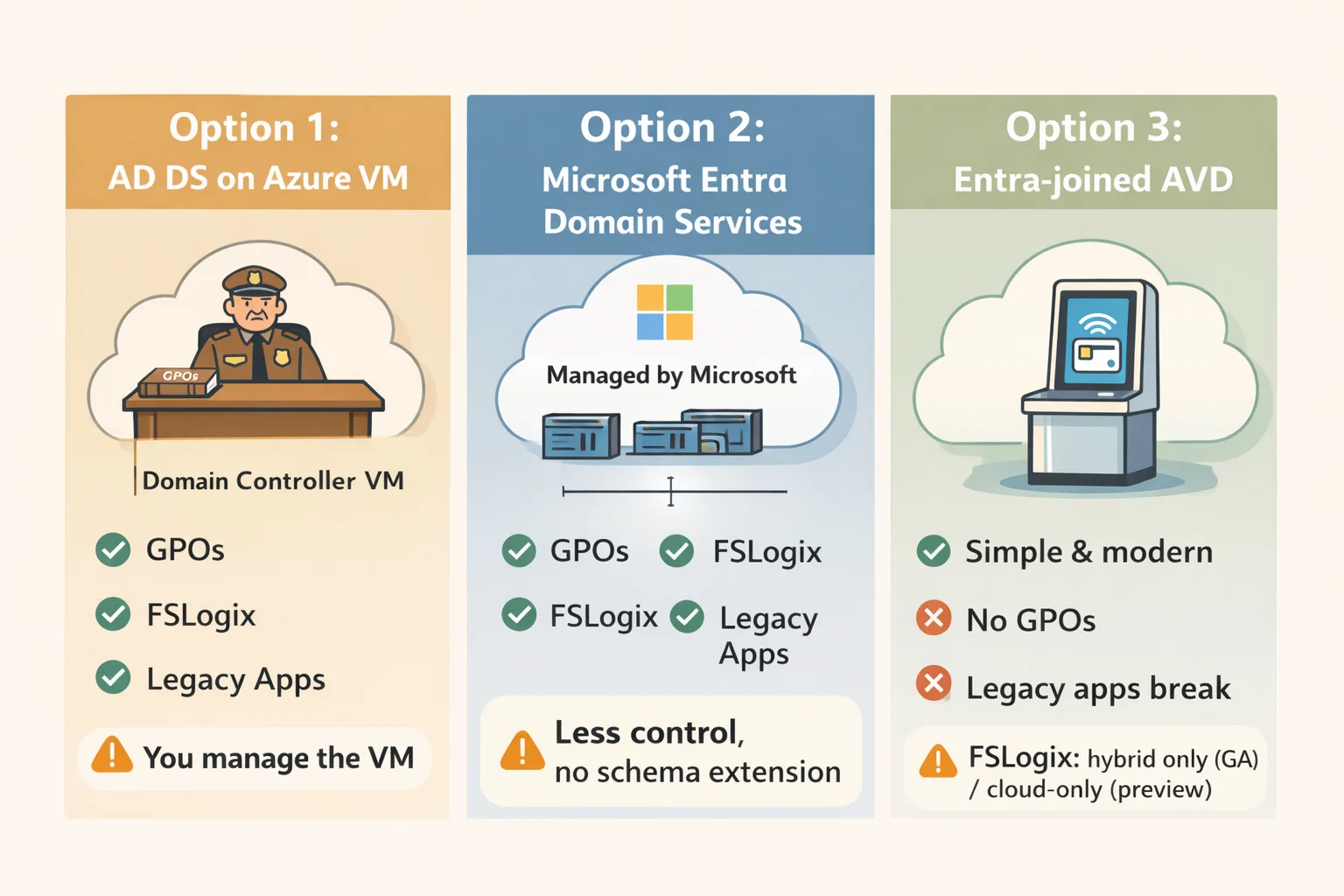
Option 1: AD DS on an Azure VM (The Old Guard in the cloud lobby)
You spin up a Virtual Machine, install AD DS, and promote it to a Domain Controller. This gives you the full traditional experience: GPOs, Kerberos, NTLM fallback, and compatibility with every legacy application. This is what most enterprises with existing on-premises AD DS environments choose.
Option 2: Microsoft Entra Domain Services (The Managed Old Guard)
Microsoft Entra Domain Services (Entra DS, formerly Azure AD DS) is a fully managed PaaS service. Microsoft runs the Domain Controllers for you. No VMs to patch, no infrastructure to maintain. It still speaks Kerberos and NTLM and supports GPOs, so legacy apps and FSLogix work just fine. The catch: you get less control than a self-managed AD DS deployment, and you cannot extend the schema.
Exam Tip: If the exam scenario says "the team wants domain services without managing VMs," the answer is Microsoft Entra Domain Services, not AD DS on a VM.
Option 3: Entra-joined AVD (Smart Keycards only)
Session Hosts are joined directly to Entra ID with no AD DS or Entra DS in the picture at all. This is the simplest modern setup and works well for cloud-native organisations. Limitations: no traditional GPOs (use Intune instead), and legacy apps that require Kerberos/NTLM will break. FSLogix profiles on Azure Files are supported via Entra ID Kerberos authentication for hybrid identities (GA). For cloud-only identities with no AD DS sync, FSLogix via Entra Kerberos is still in preview as of this writing.
Exam Tip: If the exam mentions "legacy authentication," "complex GPOs," or "apps that require Kerberos," you need either AD DS (Option 1) or Entra DS (Option 2). Entra-joined alone will not be sufficient.
4) Why do we create a Virtual Machine for AD DS?
When you go with Option 1, those virtual desks (Session Hosts) need constant, lightning-fast communication with the Old Guard to process logins and apply GPOs instantly.
Imagine your new cloud office building (your Azure VNet) is located in a data center in Sydney. But your company's Master Security Guard (your physical AD DS server) is sitting in a dusty server closet in your old physical headquarters in Newcastle.
The Traffic Jam (Latency): Every single time an employee logs in, the desk in Sydney has to make a long-distance phone call down the highway to Newcastle to ask, "Is Hark allowed in?" This delay causes incredibly slow login times for your users.
The Reliability Risk: If the internet connection (VPN or ExpressRoute) between Sydney and Newcastle drops, no one gets into their virtual desktops. The whole office shuts down.
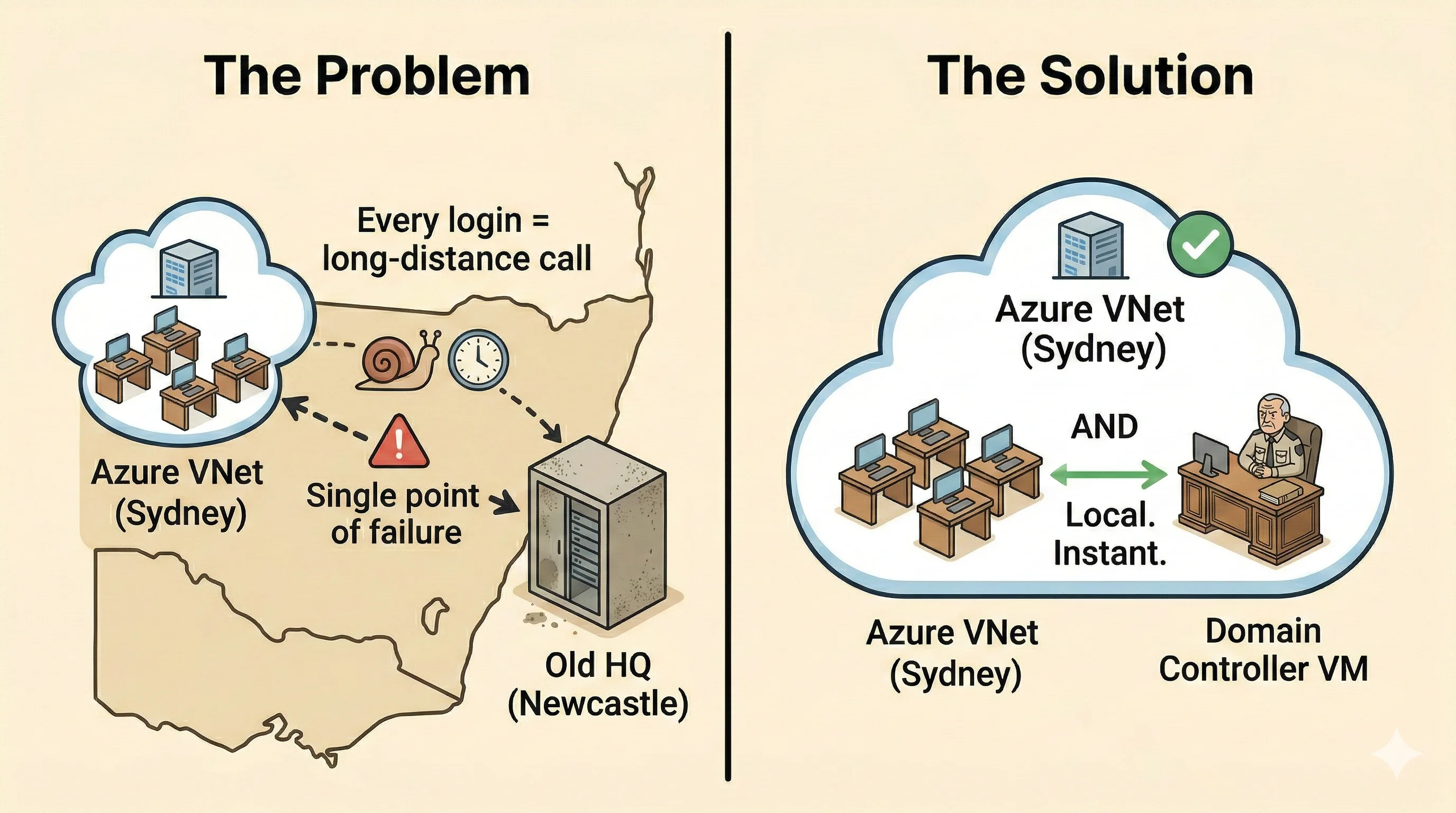
The Solution: Build a Desk in Azure
You don't rely on the distant guard in Newcastle.
Instead, you build a brand new desk right inside the Sydney cloud office lobby. You create a Virtual Machine in your Azure VNet, install AD DS on it (promoting it to a Domain Controller), and give it an exact, synchronized copy of the master guestbook from Newcastle.
Now, when AVD users log in, the authentication checks happen locally and instantly right there in the Sydney VNet. They don't depend on a fragile internet connection back to the physical office.
If you'd prefer not to manage that VM yourself, remember that Option 2 (Entra DS) handles this for you automatically.
Wrapping Up Part 1
Building on the SSW cloud office from Part 0 (the Building, the Rooms, the Security Guards, and the Magical Backpacks), here is where identity fits in:
- Entra ID (The Badge Office and Smart Keycard) verifies users at the cloud's front gate and handles modern web apps.
- AD DS on a local VM (The Old Guard in the lobby) manages strict desk rules (GPOs), provides traditional Locker Room access (FSLogix), and keeps legacy filing cabinets (older apps) working.
- Microsoft Entra Domain Services is a managed version of the Old Guard where Microsoft looks after the desk so you don't have to.
- Entra Connect is the sync bridge that keeps both the Old Guard's guestbook and the Badge Office's records in agreement, so users only ever need one set of keys.
Stay tuned for Part 2 of the AZ-140 series.